![podaris_logo_png.png]](https://support.podaris.com/hs-fs/hubfs/podaris_logo_png.png?height=50&name=podaris_logo_png.png)
A street network is not only its roads. Where those roads meet decides which movements are possible, and a network that looks right on the map can still route badly if a junction is wrong. This article covers everything you can set at a junction in the street editor.
With the Select tool active, click a junction rather than a link.
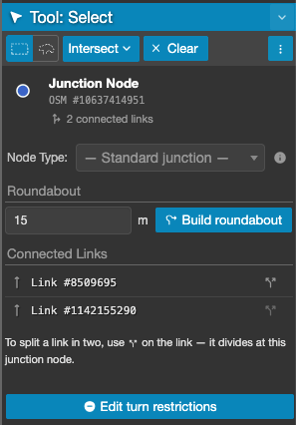
The header names the junction, shows its identifier and reports how many links meet there. If the junction came from OpenStreetMap, the identifier is a link that opens the same node on openstreetmap.org. Junctions Podaris created have no OpenStreetMap identity and show no link.
A junction that exists only in your unpublished edits is marked as pending, and tells you it becomes fully editable after rebuilding. Draw a new road today and its new junctions behave that way until the next rebuild.
Junction type
Node Type says what kind of control the junction has: traffic signals, a stop sign, a give way, or a crossing. Leave it unset for an ordinary priority junction.
How are node types used? All four types affect routing, not just the map. The router applies a delay on the approach to a controlled junction, so a corridor with signals at every intersection produces slower and more realistic journey times than the same corridor without them, and a stop costs more than a give way. If you are modelling a scheme that adds, removes or downgrades control at a junction, set this.
The delay applies per approach rather than to the junction as a whole, so controlling one arm does not penalise traffic on the others.
A crossing recorded as a signalised type, such as a pelican or toucan, is treated as traffic signals rather than as a plain crossing.
Two further controls are honoured but cannot be set here, because they come from the underlying OpenStreetMap data: traffic calming such as humps, tables and chicanes, and level crossings. A level crossing carries a much larger delay than any junction control, so check for one before concluding that a route is unexpectedly slow.
Note: Junction type is for a point where links already meet. To add a crossing, signals, a stop or a give way part-way along a link, select the link instead and use Place feature…. Podaris splices it into the road at the next rebuild.
Connected links, and splitting
Connected Links lists every link meeting at the junction. Each row has a button to select that link, and a split button that divides it in two at this point.
If you need to apply turn restrictions or build a roundabout, the links that go through your junction must be split into two and must not be continuous. You can do this with the split link button. 
Building a roundabout
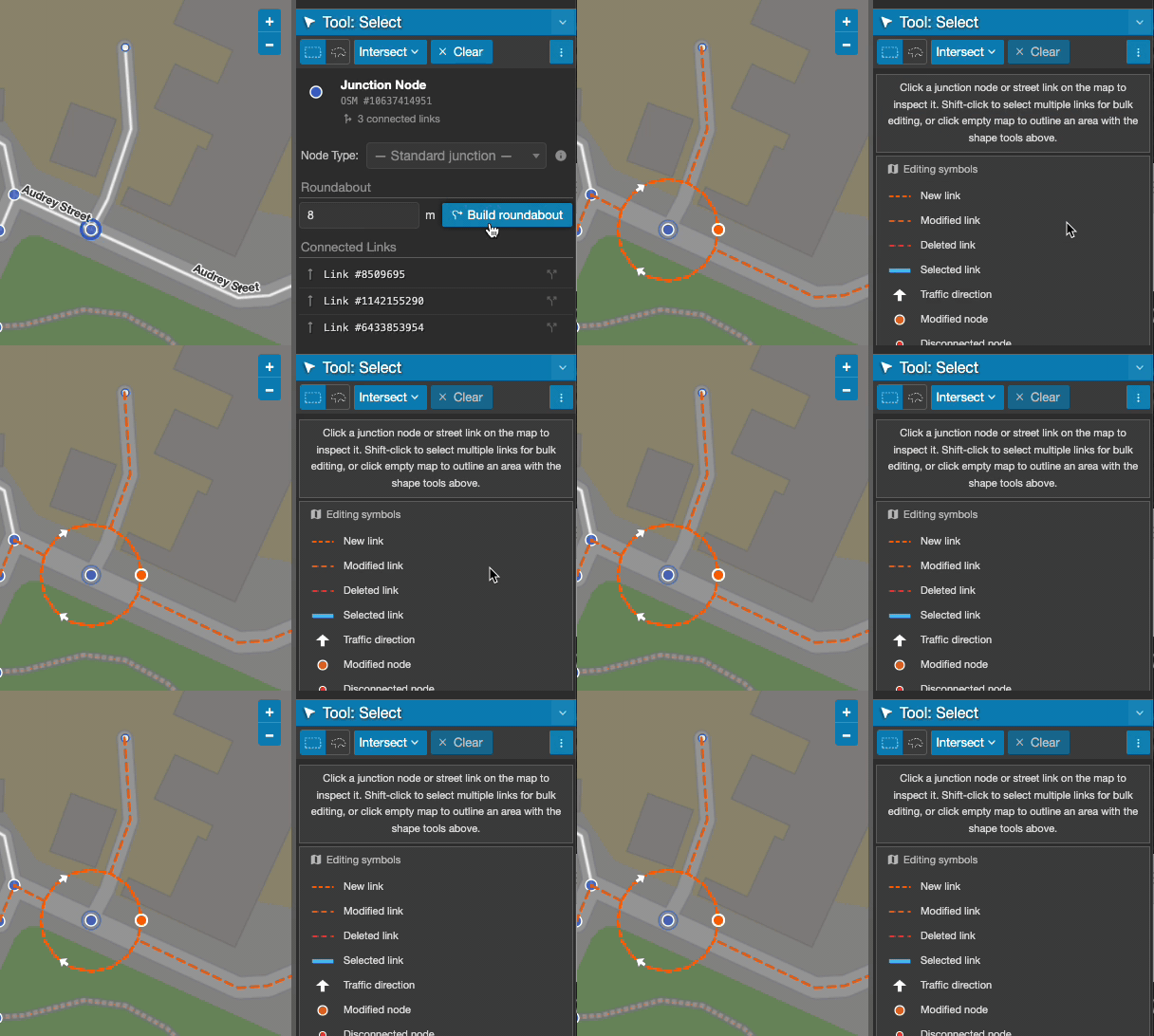
Build roundabout replaces a junction with a one-way circulating carriageway and trims every approach so it meets the circle cleanly. The whole thing is a single undoable step.
- Split any link that passes straight through the junction, so every arm ends there.
- Rebuild the network.
- Select the junction.
- Set the radius in metres. The default is 15 and the range is 5 to 100.
- Click Build roundabout.
The direction of circulation follows your project's drive side, so a UK project gets a clockwise roundabout without you setting anything.
If you see "No approach arms long enough for that radius.", the circle would swallow the roads meeting it. Use a smaller radius, or check that the approaches are split at the junction rather than continuing through it.
Turn restrictions
Turn restrictions are how you model a banned right turn, a no-entry movement, or a compulsory left. They are the difference between a network that is geometrically correct and one that routes the way the street actually works.
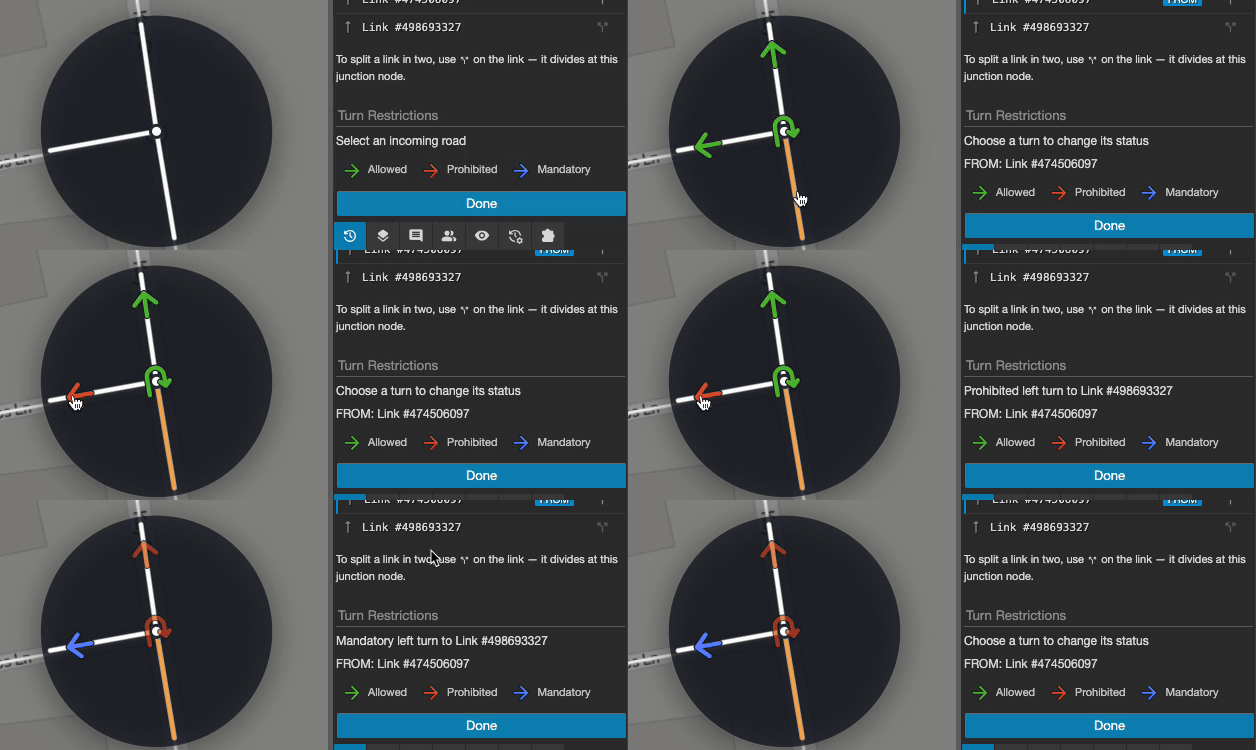
Click Edit turn restrictions and a diagram of the junction appears on the map, with a control for every possible movement.
- Choose the approach you are restricting. The panel marks it as the FROM arm.
- Click each turn from that approach to cycle it through three states.
- Click Done.
| State | Meaning |
| Allowed | The default. No restriction is recorded. |
| Prohibited | This movement is banned. Use it for a no-left-turn, a banned right, or a no-entry. |
| Mandatory | Traffic arriving on this approach must take this turn. Everything else from that approach is implicitly banned. |
A legend on the panel shows the three colours. You never type a tag: Podaris works out the correct restriction from the geometry of the arms, so a turn that is geometrically a right turn is recorded as one, whichever side of the road your project drives on.
Prefer Prohibited when only one or two movements are banned, and Mandatory when only one is permitted. Setting several mandatory turns from the same approach conflicts, and Podaris warns you.
Working with the restriction list
Alongside the junction diagram, the panel lists every restriction at this junction. Each entry names the link traffic comes from and the link it is turning into, with the via point where there is one, and beneath it a row for each rule that applies.
Each rule shows the mode it applies to, and its schedule where the restriction only applies at certain times. Edit and Remove act on that rule alone.
Rules brought in from OpenStreetMap that the editor cannot safely change are marked as imported and preserved as supplied. They still affect routing, but they are read-only.
Restrictions apply per mode
A turn restriction does not have to apply to everyone. Use the Except control on a restriction to exempt Buses, Bicycles or Cars, which is how you model a banned turn that buses are permitted to make, or a no-entry that cycles may ignore.
Exemptions recorded against a broader category are respected, so a restriction that already exempts all vehicles shows cycles as exempt without you setting it again.
Note: Turn restrictions apply to vehicles only. Walking routes ignore them completely, so a banned turn will never change a pedestrian isochrone or a walking journey.
Timed restrictions
A restriction can apply only within a weekly day and time window, such as a banned right turn during the morning peak. While the window is active it overrides whatever the restriction would otherwise be, and outside it the underlying rule applies.
To check a timed restriction behaves as you intended, use the Route Preview tool and set its day and departure time inside and then outside the window.
Tip: A restriction can cover a sequence of links rather than a single turn, which is how a movement through a short connecting road is described. These are shown with their via link named in the list.
Restrictions that need review
A turn restriction refers to specific roads. If you later reshape one of them, or move the junction, the restriction may no longer describe a real movement.
Podaris does not drop it silently. The Versions panel lists affected restrictions under your pending changes, marked as either needing review or likely broken, with a button to remove each one. Clear these before you rebuild: a restriction that no longer attaches to the road it names will either be ignored or block the wrong movement.
See Street Network Versions & Scenarios.
Messages you may see
| Message | What to do |
| No approach arms long enough for that radius. | Use a smaller roundabout radius, or split the approaches at the junction first. |
| Roundabout radius must be between 5 and 100 metres | Enter a radius in range. |
| Could not update turn restriction | Usually a conflicting mandatory turn on the same approach. Set the others back to Allowed first. |
| This junction is part of the pending network and becomes fully editable after rebuilding. | The junction only exists in your unpublished edits. Rebuild the network first. |
| Network data unavailable | The network has not finished building, or the build failed. Check the Setup Streets page. |