![podaris_logo_png.png]](https://support.podaris.com/hs-fs/hubfs/podaris_logo_png.png?height=50&name=podaris_logo_png.png)
What is an API?
An API (Application Programming Interface) is a set of rules and tools that allows different software systems to communicate with each other. You can think of it as a bridge — it enables one application to ask another for data or to perform certain actions, without needing to understand how that application works internally.
For example, when a mapping app shows live transport information, it’s usually getting that data from another service through an API. APIs make it possible to connect different systems, automate workflows, and build new tools that extend existing platforms.
In the context of Podaris, our APIs allow developers, planners, and analysts to interact with the same systems that power our web application — opening up powerful possibilities for integration, automation, and custom tool creation.
Building on Podaris
The same APIs that power our own web client are available to you. This means you can bring real-time synchronisation to your own applications — whether they run on the desktop or in the cloud.
By doing so, you can extend Podaris to work seamlessly with other planning tools, simulation engines, or custom-built solutions — turning Podaris into a platform that integrates with and enhances your workflow.
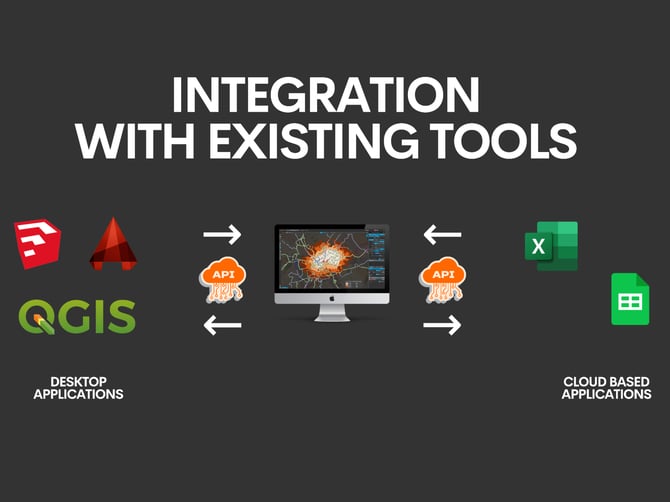
The Podaris APIs
Podaris provides several APIs, each designed to interact with specific parts of the platform.
Here's an overview of what they do:
| Insight API |
The Insight API enables you to start analysis runs and export results. |
| Simulator API |
The Simulator API allows you to create demand scenarios, configure and run simulations, and download results. |
| Entities API | This API gives granular access to the data within a project, including layers, data layers, stations, and routes.
You can both read and edit these entities, and editing is asynchronous.
|
| Notifications API |
The Notifications API provides webhooks for update events to projects. |
| Infrastructure API |
The Infrastructure API gives low-level access to control lines and control points. This is mostly used by customers connecting Podaris to their own microsimulators for demand-responsive systems. |
Generating API Access Key
In order to use the Podaris API you will need to generate an access key from within Podaris.
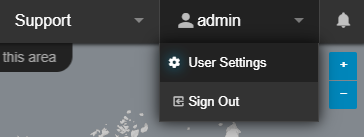
You'll find the Access Keys panel in your User Settings, which is accessible from the drop down menu underneath your username.
From within the Access Keys tab of the User Settings page, click the Generate Token button to create a new token.
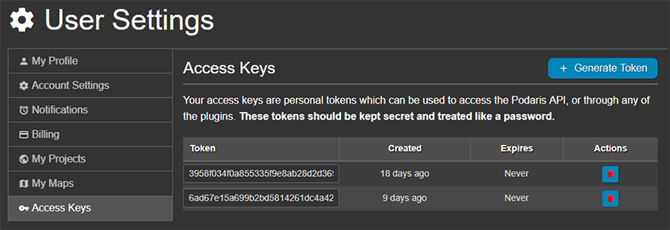
NOTE: Tokens should be created with the confidentiality of passwords as they provide access to your account and your projects.
Explore the Podaris Platform API
To begin working with the Podaris API you can explore our generated docs here, or replace the "platform" word with your organisation's URL.
https://platform.podaris.com/apidocs/
Please do let us know if you need any help setting this up!