![podaris_logo_png.png]](https://support.podaris.com/hs-fs/hubfs/podaris_logo_png.png?height=50&name=podaris_logo_png.png)
 What is Podaris:Insight?
Podaris:Insight is a toolkit for simplifying a number of types of accessibility analysis. It is designed to dramatically speed up the process of performing accessibility analysis on networks and datasets created or imported in Podaris. It provides a simple interface through which analysis projects can be created and shared, and the corresponding results exported. You can learn more about Podaris:Insight and the analysis types that it offers here.
What is the individual isochrone analysis type?
The individual isochrones analysis is designed for running isochrones for a collection of locations individually, in a single analysis run.
It works in a very similar way to the standard isochrone analysis, but should be used for cases where you need separate isochrone results for each location rather than one overall accessibility result aggregated across all points in your location dataset.
Step by Step
The steps for setting up and running the individual isochrones analysis is identical to that of the isochrones analysis set-up, except for one small difference.
In the standard isochrone analysis, you can choose whether to process locations together or individually. In the individual isochrone analysis, locations are always processed individually, and the option is not shown.
To read more about the set-up of the analysis and understand how to set-up an individual isochrone analysis, please refer to the Podaris:Insight isochrone analysis page.
Interpreting results
Just like for the isochrone analysis, the results page displays calculations of any dataset queries constructed during setup. The legend on your map indicates which colours relate to which duration contour and the isochrones themselves depict the areas that can be reached to or from each individual location in the displayed timeframes.
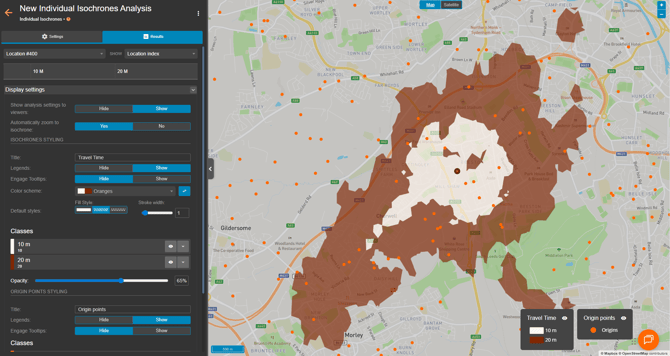
In the Individual Isochrones Analysis, the map visualisation displays the isochrone for a single selected location. You can select a location either from the results table dropdown on the left-hand side of the results page, or by clicking directly on a point in the interactive map. Once a location is selected, the map updates to show the isochrone calculated specifically for that point.

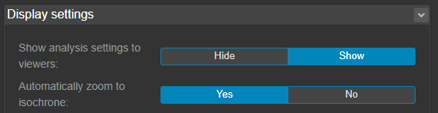
You can also control how the map behaves when selecting locations. By toggling Automatically zoom to isochrone on or off, the map can either zoom to the selected isochrone automatically or remain at its current viewport.
Exporting results
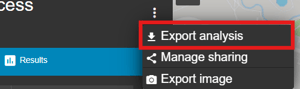
Your analyses can be exported by clicking the 3 dots at the top of the results page and clicking export analysis. From here, you can export in a variety of formats, such as GIS and CSV.