![podaris_logo_png.png]](https://support.podaris.com/hs-fs/hubfs/podaris_logo_png.png?height=50&name=podaris_logo_png.png)
When to use a Streets project
- You are modelling a proposed new road or busway that does not yet exist in OSM
- OSM data for your study area is incomplete or inaccurate
- You want to model a bus rapid transit (BRT) corridor or guided busway with specific access rules
- You need a controlled street environment for simulation work, rather than relying on live OSM data
How Streets projects work
- Bus route alignment — bus routes snap to the streets in your network
- Isochrone calculation — walking, cycling, and driving isochrones follow your custom network
- Journey planning and simulation — multi-modal routing uses your network for the road-based legs
Creating a Streets project
- On the Podaris home screen, click New and select Streets.
- Set your privacy level and starting location, then click Create.
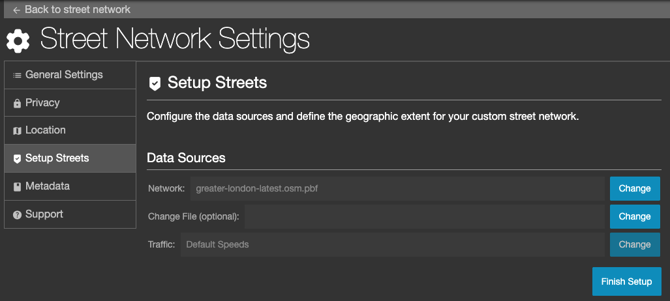
- You will be taken to the project settings page, where you can upload your network file.
- Click Upload an OSM file and choose your file (up to 500 MB).
- Once the upload is complete, click Finish Setup. Podaris will process the file and prepare the routing engine.
Useful OSM tags for routing
| Tag | Effect |
| highway=bus_guideway | Permits bus routing only |
| highway=cycleway | Permits cycling only |
| motor_vehicle=no | Closes the road to motor vehicles |
| maxspeed=* | Sets the maximum speed (km/h) |
Attaching a Streets project to a Plan project
Native Street Editor
Podaris now features a full, native street network editor that allows you to make edits directly in your web browser. You no longer need to rely on external desktop GIS editors or complex file exports for standard modifications.
Exporting Street Networks
Once your network has been built and published, you can export the street data from the project export menu in three formats:
- OSM PBF: The complete, raw network file for your active view’s version, integrating all custom browser patches.
- Street Network GeoJSON: A standard GeoJSON translating your links into LineStrings with their full custom OSM properties.
- Street Network GeoParquet: A highly compressed, optimised format designed for high-performance spatial analysis in desktop GIS tools like QGIS.
Views as Scenario Branches
In a Streets project, a view acts as a full scenario branch rather than a mere layer visibility toggle.
-
Isolated Scenarios: Each view points to a specific immutable, published network version. This design allows you to easily model different planning options (e.g., a "Do-Nothing" baseline vs. "Option B") within a single Streets project.
-
State Safeguards: To protect your work, the platform prevents you from switching views or previewing alternative versions while you have unpublished edits pending in your active view.
- Soft Deletions: Deleting a view only soft-deletes the version history; it preserves any historical network versions that are still referenced by other active views.
Things to keep in mind
- Street network processing can take a few minutes after upload. You will be notified when it is ready.
- If the upload fails or the network does not process correctly, use the Retry Setup button in the Streets project settings.
- Accepted formats for the base network are `.osm`, `.osm.pbf`, `.osm.bz2`, and `.osm.gz`. Changesets must be `.osc` format.
- HTTPS is required for any externally hosted tile or data sources you reference.