![podaris_logo_png.png]](https://support.podaris.com/hs-fs/hubfs/podaris_logo_png.png?height=50&name=podaris_logo_png.png)
Street Erase removes links from the network. Use it for a road that is being stopped up or demolished, or for tidying up links that should not be there.
Press X or click the Street Erase tool, then choose a mode.
Tip: If you want to stop traffic using a street rather than remove the street itself, do not erase it. Apply a Modal filter or Bus gate preset with the Select tool instead. That keeps the street available to walking and cycling, which is almost always what a real scheme does.
Link mode: removing a whole link
Click a link to mark the whole thing for deletion. It does not disappear. It stays on the map in the deleted style until the network is rebuilt, so you can see what you have removed and change your mind.
To change your mind, click the link again and choose Un-stage deletion, or undo.
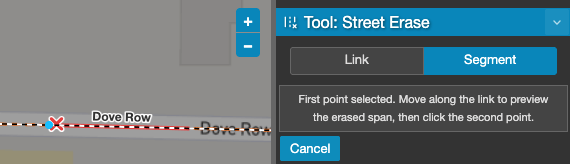
Segment mode: removing part of a link
Sometimes only the middle of a road should be deleted. Segment mode handles that.
- Click the first point on the link.
- Move along the link. Podaris previews the span that will be erased.
- Click the second point.
Both points must be on the same link. You can erase several separate spans from one link, and each is kept independently.
Links you drew in this session
Clicking a link you drew but have not yet published removes it outright rather than queuing a deletion, along with any junctions that only existed because of it. There is nothing to un-stage, because there was nothing built to delete. Undo still brings it back.
Deleting many links at once
Street Erase works one link at a time. To remove a whole area or every link matching a query, build a selection with the Select tool and use Delete N links, or press Delete. That marks the whole selection in a single undo step.
What happens on rebuild
Deletions are pending changes like any other. Nothing leaves the routable network until you rebuild it, and until then routing, isochrones and analyses still use the road you have marked. The Versions panel counts your deletions alongside the rest of your pending changes.
Watch the alert manager after deleting. Removing a link can leave a junction with nothing attached, which is reported as a disconnected node and should be fixed before you publish.